
Download Wardrobe Designer APK – wardrobe design, closet design, custom closet, wardrobe planning, closet planner, closet builder, closet organizer, closet design app, closet maker, closet blueprint
Overview
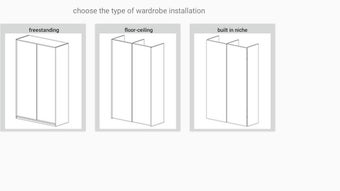
Wardrobe Designer is a specialized Android application developed by melnyk, designed to assist users in creating accurate and detailed plans for custom wardrobe closets. The software serves as a practical tool for individuals seeking to design personalized storage solutions with precision. By enabling users to define key structural elements such as cabinet installation type, number of doors, material thickness, back wall composition, and visible edge thickness, the app streamlines the process of wardrobe planning. It is particularly suited for DIY enthusiasts, interior designers, and small-scale furniture manufacturers who require reliable measurements and specifications before production.
The application focuses on generating a comprehensive specification document that includes material details, individual components, and opening dimensions for sliding doors. This output is crucial for workshop teams to manufacture the wardrobe correctly. Users can capture the final layout via screenshot and share it directly with fabricators, ensuring clarity and reducing errors. The app also supports data export to Excel, enhancing workflow integration for users managing multiple projects or collaborating with production teams. While the developer did not provide additional system requirements, the app’s lightweight size of 10.4 MB suggests it is optimized for efficient performance on mobile devices.
Key Features & Capabilities
- Customizable Cabinet Configuration – Users can select installation type (e.g., wall-mounted, floor-standing), number of doors, and material thickness to match desired design and structural needs.
- Material and Structural Detailing – The app allows specification of back wall presence and material, as well as visible edge thickness, ensuring accurate representation of the final product.
- Section Filling Options – Each cabinet section can be assigned different internal fillings, enabling users to plan for shelves, drawers, or hanging rods based on storage preferences.
- Automated Specification Generation – After inputting dimensions and selections, the app produces a detailed specification list, including materials, components, and sliding door openings.
- Screenshot and Export Functionality – Users can capture the design layout and export data to Excel, facilitating easy sharing and integration with manufacturing or project management workflows.
These features make Wardrobe Designer ideal for users preparing precise documentation for workshop production. For example, a homeowner planning a custom closet can define the space, choose materials, and generate a print-ready specification. Similarly, a small furniture maker can use the app to standardize client orders and reduce manual measurement errors. The ability to export to Excel adds value for users managing multiple projects or collaborating with teams, improving organization and data consistency.
User Interface, Workflow & Performance
The user interface of Wardrobe Designer is structured to support a linear, step-by-step workflow, guiding users through configuration options in a logical sequence. Navigation appears intuitive, with clearly labeled sections for cabinet dimensions, installation type, door settings, and material choices. The layout is optimized for touch interaction, making it suitable for use on smartphones and tablets. While specific UI details such as color schemes or iconography were not disclosed, the app’s focus on functionality suggests a clean, task-oriented design.
Workflow efficiency is enhanced by the app’s automated output generation, minimizing manual calculations and reducing the potential for human error. Users can adjust parameters in real time and immediately see the updated specification. The developer did not specify resource usage details, so performance behavior under load or in low-memory conditions remains unknown. However, the app’s 10.4 MB file size indicates it is designed for lightweight operation, which typically correlates with stable performance on modern Android devices. Stability and responsiveness are expected to be consistent for typical usage scenarios, though exact behavior may vary depending on device hardware and Android version.
Compatibility & System Requirements
Wardrobe Designer is available exclusively for Android devices. The current version is 1.0.3, with a download size of 10.4 MB. The app is designed to run on Android operating systems, though the specific minimum OS version was not listed by the developer. Installation is straightforward, and the app does not require additional software or system components.
Exact system requirements were not listed. This includes details about required RAM, CPU architecture, or supported Android versions. As such, users should ensure their device meets general Android app compatibility standards. The developer did not provide information on hardware-specific requirements, such as screen resolution or storage space beyond the base installation size. Users are advised to check their device’s compatibility before downloading, especially if using older or less common Android models.
Pros and Cons
Pros
- Specialized tool for accurate wardrobe and closet design
- Generates detailed specifications for manufacturing
- Supports data export to Excel for better organization
- Lightweight installation at just 10.4 MB
- Intuitive interface for step-by-step configuration
Cons
- Android-only platform limits cross-device use
- No information on minimum system requirements
- Price point of $4.99 may be high for casual users
- Export functionality may lack advanced formatting options
- No cloud sync or project saving feature mentioned
FAQ Section
Is Wardrobe Designer compatible with iOS devices?
Wardrobe Designer is currently available only for Android devices. There is no official version for iOS platforms.
Is the app safe to download and use?
As the app is distributed through standard Android channels and developed by melnyk, it is considered secure for use. Users should download it from trusted sources to ensure integrity.
How often are updates released for Wardrobe Designer?
The developer has not specified a release schedule for updates. The latest version available is 1.0.3, released on May 3, 2024.
What type of license does Wardrobe Designer use?
Wardrobe Designer is a one-time purchase application priced at $4.99. It does not appear to include a subscription model or in-app purchases.
Can I use Wardrobe Designer offline?
Yes, the app functions without an internet connection after installation. All design and specification generation occurs locally on the device.
Final Thoughts
Wardrobe Designer delivers a focused and practical solution for users who need to create accurate, production-ready plans for custom wardrobes and closets. Its ability to generate detailed specifications, support Excel export, and guide users through a structured workflow makes it a valuable tool for both hobbyists and small-scale professionals. While the Android-only platform and lack of detailed system requirements are limitations, the app’s lightweight nature and clear purpose mitigate many concerns. For anyone involved in closet design or furniture planning, Wardrobe Designer offers a reliable, efficient way to translate ideas into manufacturable blueprints. Its specialized functionality sets it apart from general-purpose design tools.
Download Wardrobe Designer now




.png)


